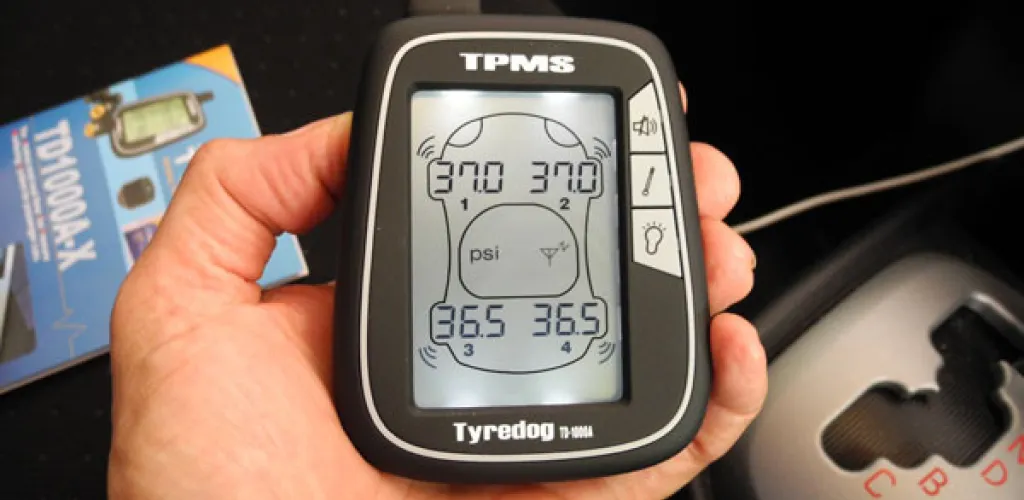
- Direct TPMS uses tire pressure sensors; indirect TPMS uses wheel speed/ABS data.
- Universal reset: inflate to recommended, deflate to zero, re-inflate, drive 10-15 minutes at 25-30 km/h.
- Reset button: turn on ignition, hold button 3-5 seconds, drive 20-25 minutes above 50 km/h.
- Some cars allow TPMS reset by disconnecting the battery.
The Tire Pressure Monitoring System (TPMS) is a standard feature on most modern cars, designed to alert you when the pressure in your tires isn’t optimal. While it’s a valuable safety feature, many drivers experience a TPMS warning that stays on even after inflating the tires to the recommended level.
Persistent TPMS warnings after proper inflation are common and can have several causes: sensors not correctly recalibrated, fault codes stored in the system, or sensors that are defective. In the following sections, you’ll learn how to resolve this at home, for any car make.
Types of TPMS systems and how they work
Direct TPMS
Direct TPMS uses physical sensors mounted on the tire valve stem or wheel. These sensors measure tire pressure directly and send wireless information to the car’s onboard computer. The advantage is high accuracy, but extreme weather conditions can affect it and the sensors’ batteries can eventually run down.
Indirect TPMS
Indirect TPMS works via wheel speed sensors or through the ABS system. The principle is that a tire with low pressure has a smaller circumference, so it will rotate faster than the others at the same speed. The computer detects these differences and activates the TPMS light. This system is more common in Europe and does not require additional batteries.
Preparing for the TPMS reset
Before starting the reset process, it’s essential to check and correct the tire pressures in all tires, including the spare if equipped with a TPMS sensor. Use a quality tire gauge to ensure the pressure matches the manufacturer’s recommended values, usually posted on the driver’s door jamb or in the owner’s manual.

Universal TPMS reset method
This method works for most vehicles and can be tried regardless of the car make:
- Inflate all tires to the recommended pressure using a precise gauge
- Completely deflate all tires to zero pressure
- Inflate tires again to the correct pressure
- Start the car and drive for 10-15 minutes at a constant speed of 25-30 km/h
- Stop the engine and restart it to see if the light goes away
This method forces the sensors to recalibrate automatically and works in about 70% of cases.
Resetting TPMS using the dedicated button
Most cars equipped with direct TPMS have a dedicated reset button, usually located under the steering wheel or near the pedals.

Step-by-step procedure:
- Turn the ignition on without starting the engine
- Locate the TPMS reset button (it may be marked with a tire symbol or the text TPMS)
- Press and hold the button for 3-5 seconds
- Release the button when you see the TPMS light blink
- Start the car and drive 20-25 minutes at speeds above 50 km/h for automatic calibration
Speed and driving time may vary by brand and model. Some systems require higher speeds or longer calibration periods.
Resetting TPMS by disconnecting the battery
This simple method can resolve minor ECU errors:
- Turn off the engine and remove the key
- Disconnect the negative battery cable
- Leave the battery disconnected for 2-3 minutes
- Reconnect the battery and start the car
- Check if the TPMS light has disappeared
This method resets all electronic systems of the car, not just TPMS, so you may need to reset other settings such as the radio or clock.
Using a specialized TPMS tool
There are dedicated TPMS reset tools on the market, compatible with different car makes. These devices connect to the car’s OBD2 port and allow quick system reset with a simple button press. A professional OBD2 scanner can also detect and clear TPMS fault codes stored in memory.
Brand-specific TPMS reset instructions
Honda TPMS reset
For Honda models 2016 and newer with a touchscreen:
- Access the home screen
- Select “Settings” from the menu
- Navigate to “TPMS Calibration”
- Select “Calibration” and confirm
For Honda models without a touchscreen:
- Use the steering wheel controls to access the menu
- Navigate to “Customize Settings”
- Select “TPMS Calibration”
- Choose “Initialization”
For older Honda models:
- The “Reset TPMS” button is on the left side of the steering wheel
- Press and hold the button for a few seconds, then release

Toyota TPMS reset
- Locate the TPMS reset button under the steering wheel, near the pedals
- With the ignition on, press and hold the button for 5 seconds
- Start the engine to check if the warning light has disappeared
- Important for Toyota: never leave a tire without the valve cap after inflation, as this can cause TPMS errors
Volkswagen TPMS reset
Procedure varies by year:
Older models:
- Find the TPMS button near the gear shifter or in the glove box
- Press the button for a few seconds until you hear a beep
- Release the button when you hear the audible signal
Newer models:
- Use the cluster menu to access TPMS settings
- Navigate to the reset option in the vehicle settings
Chevrolet TPMS reset
This procedure is more complex and may require special equipment:
Newer models:
- Put the key in the ignition without starting the engine
- Use the instrument cluster to navigate to “Vehicle Information”
- Select “Tire Position Learn”
- Choose “Set” or “Reset”
Older models:
- Press the odometer reset button until “Active Tire Learning” appears
- For full calibration, a special tester J-46079 is required
- For this reason, many Chevrolet service centers recommend performing the procedure at a dealer
Mini Cooper TPMS reset
For Mini models 2002-2006:
- The button is near the brake hold lever
- With the ignition on, press the button until the yellow light blinks
- The TPMS will recalibrate on the next trip
For Mini models 2007 and newer:
- Start the car and go to the instrument cluster to “Set/Info”
- Scroll down until the tire monitor symbol appears
- Select “Reset” to recalibrate the system
Diagnosing faulty TPMS sensors
If the methods above do not resolve the issue, the TPMS sensors may be damaged and require replacement. Sensors can fail due to:
- Battery wear in direct TPMS sensors (lifespan: 5-10 years)
- Physical damage from impacts or driving on rough roads
- Interference caused by brake system work or wheel work
- Corrosion due to road salt or moisture
- Electronic faults in the TPMS control module
Signs of a faulty TPMS sensor include:
- The light stays on permanently
- Erroneous tire pressure readings
- No signal from one or more sensors
- Intermittent light activation without an obvious cause
Important considerations about disabling TPMS
Although it is theoretically possible to deactivate TPMS, this is not recommended for the following reasons:
- TPMS is mandatory for all cars manufactured after 2008 in many countries
- Safety is compromised — underinflated tires can cause serious accidents
- Fuel economy can decrease by 3-4% when tires are underinflated
- Premature wear of tires and the suspension system
- Potential issues with vehicle inspections, as a TPMS light can cause a fail
Preventive maintenance of the TPMS
To avoid TPMS problems, follow these recommendations:
- Check tire pressure monthly; don’t rely solely on TPMS
- Replace sensors according to the manufacturer’s recommendations
- Inform the service about TPMS when changing wheels
- Avoid impacts with curbs or potholes
- Use only TPMS-compatible replacement parts
Conclusion
Resetting the TPMS at home is possible in most cases, but requires attention to detail and adherence to brand-specific procedures. Before attempting any reset, ensure all tires are inflated to the manufacturer’s specifications.
If none of the methods described resolve the issue, it’s advisable to seek a specialized service equipped to diagnose and repair the TPMS. Remember that this system is in place for your safety and that of others on the road, helping prevent accidents caused by tires with incorrect pressure.