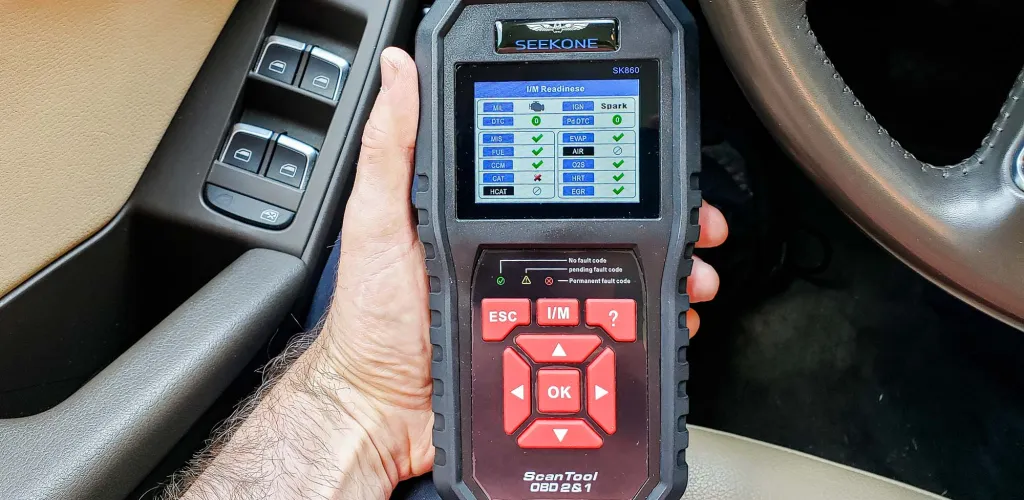
- OBD-2 scanners provide error details but don’t fix problems.
- Use them before service for pre-diagnosis when the Check Engine light is on.
- They monitor performance and explain stored error codes.
- Steps: locate port, connect, sync with app, run scan.
When you start your car in the morning and hear a new, strange, or distracting sound coming from the engine, your first instinct is to pop the hood and look for the source of the problem. If you don’t find anything visibly different besides that suspicious sound, the solution isn’t to start tearing the car apart at random.
Before you despair, the most intelligent approach is to use an OBD-2 car tester that will provide you with concrete information about what is happening with your vehicle. This device represents a modern and efficient method to identify problems your car has or has had in the past.
When is the Right Time to Use an OBD-2 Tester
It’s important to understand that the OBD tester isn’t a magic wand. This device won’t repair the car’s problems, nor should you expect it to. Its main role is to provide detailed information about the errors detected by the vehicle’s electronic systems.
Some testers display errors only when the Check Engine light is on; they can clear error codes and make the light disappear temporarily. However, if you don’t address the underlying cause of the problem, the error will reappear and the light will come back on.
Situations Where It’s Worth Using the Tester Yourself
To get the most out of an OBD-2 tester, you need to know when and why to use it. We recommend using the tester to obtain as many details as possible about the car’s problems before you go to a service.
Cases where it is beneficial to perform a pre-diagnosis:
-
Check Engine light is on: the most well-known dashboard indicator, which can point to hundreds of different problems related to the engine, transmission, or exhaust system. Using an OBD-2 tester and a free phone app you can quickly learn the specific problem.
-
Vehicle performance monitoring: many testers and apps provide access to detailed statistics about how the car is running. You can read oil temperature, coolant temperature, oil pressure, or fuel pressure in the fuel rail.
-
Checking error history: even if the light isn’t on, the system may have stored past errors.
What Equipment You Need for Diagnostics
In theory, performing a basic diagnosis is quite simple. The complexity depends on how much information you want to obtain and your level of technical knowledge. Besides some fundamental concepts of auto mechanics and electronics, you need only:
- Sufficient time for the procedure
- Access to the vehicle
- An OBD-2 diagnostic device
- A smartphone with the appropriate app
How OBD-2 Scanners Work
OBD-2 scanners are the easiest to use for basic diagnostics. The process is simple:
- Locate your car’s OBD-2 port (you can search Google for your specific model)
- Connect the tester to the car
- Sync the device with your phone via the app
- Run the scan
If the car has errors stored in the ECU, you will see them displayed. Many apps provide detailed explanations for each error code. If the information isn’t enough, you can search the specific code on specialized sites that will explain what the error means and which components should be checked or replaced.
Important: Cars manufactured before 1996 do not have a standard OBD-2 port. For these older vehicles you will need to seek classic service diagnostics.
Locating the OBD-2 Port
Locating the OBD-2 port may seem tricky at first glance, but it is actually a simple operation. The port is almost always under the steering wheel or beneath the dashboard, usually on the left side, closer to the driver’s door.
There are exceptions (such as some Dacia Logan models with the port in the glove box), but these are rare. The most effective method is to Google your car’s model along with the year of manufacture and check the images.
Connection Procedure
- Stop the engine before connecting the device
- Turn on the ignition to power the electrical systems
- Synchronize the device with your phone
- Start the engine to view real-time errors
Warning: Remove the OBD tester after finishing the diagnostic. It draws power and leaving it connected overnight can drain the car’s battery.
Advantages of Using an OBD-2 Tester
The main motivation for using a personal tester is cost savings. No one will diagnose your car for free, and auto services charge for diagnostics even if they have testers that cost several thousand euros.
Although professional service testers are much more expensive and complex, the basic information they provide is similar. Any modern car stores errors in the ECU (engine control unit), and any OBD-2 tester can read these codes.
Process of Reading Error Codes
After connecting the tester and performing the scan, you will see the errors stored in the ECU. The tester can download and save the codes for reference. Usually, you will see codes such as P2063, P0171, P0300, etc.
These codes may look cryptic at first, but each has a specific meaning. To understand what each code represents, you can consult online databases that will explain:
- The probable cause of the fault
- The affected components
- The recommended troubleshooting steps
- Parts that may need replacement
Some modern scanners require entering the vehicle VIN, especially on first use with a given vehicle. After finishing the scan, note the codes and save the information either in the app or via a screenshot.
Managing the Check Engine Light
If you have the Check Engine light on the dash, you can temporarily clear the codes to make it disappear. Warning: the light will reappear in a few days or after several start cycles if you do not resolve the underlying problem that caused the error.
Next Steps After Diagnosis
After obtaining information from the tester, the most important step is to resolve the identified problems. Now everything depends on the complexity of the fault and your technical experience.
Repairs You Can Do Yourself
If you have experience with small auto repairs and the problem isn’t very serious, you can try to fix it yourself. Examples of affordable repairs:
- Replacing an oxygen sensor
- Changing the spark plugs
- Replacing the air filter
- Checking and tightening electrical connections
- Replacing fuses
When to Call a Professional Service
If the tester shows multiple errors or the problem seems complex, it’s recommended to visit a service for a more detailed diagnosis. In this situation, the information obtained with a personal tester will be very useful for:
- Better understanding the mechanic’s explanations
- Avoiding potential overcharging
- Having a solid technical discussion base
- Verifying that all problems have been identified and resolved
Using a personal OBD-2 tester does not replace professional diagnostics for complex problems, but it provides a clear view of the car’s condition and helps you make informed decisions about repairs.